Spelling & Phonics: Kids Games
- 4.6
- Rating
- 10.00M
- Installs
- Free
- Price
 Analysis by App-foxy
When I first opened Spelling & Phonics: Kids Games, I immediately understood its place: this is a gentle educational game for children who are beginning to connect letters, sounds, and simple words. It is not trying to be a full reading course or a competitive arcade game. Its appeal comes from turning short spelling and phonics exercises into something a child can approach without feeling as if they are sitting through a formal lesson.
The game is free, rated for Everyone, and developed by RV AppStudios. It has reached over ten million installs and holds a 4.6 average from around twenty-eight thousand ratings, which gives it a substantial audience among families looking for an accessible first step into literacy practice. I would describe it as a useful companion for early learners rather than a replacement for a teacher, parent, workbook, or structured reading program.
How the first goals make learning feel approachable
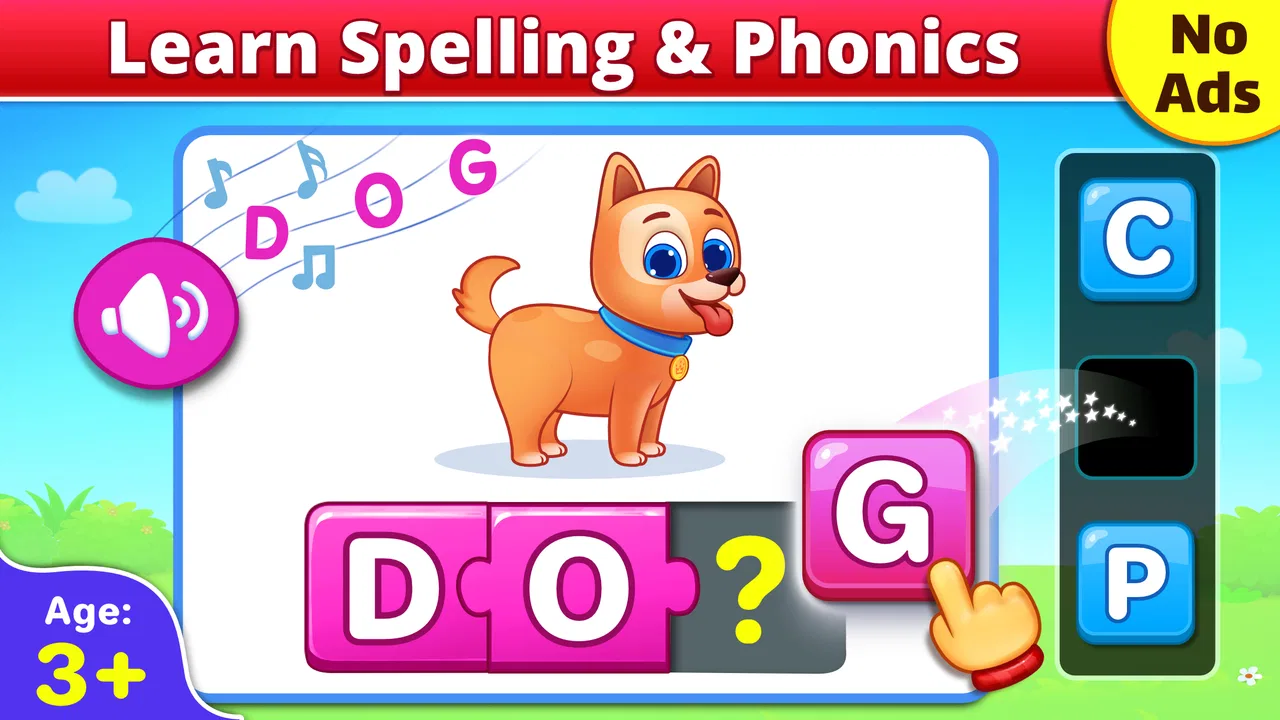
The opening experience is built around familiar learning targets: spelling, phonics, CVC words, and basic vocabulary. CVC means consonant-vowel-consonant words, the short forms children often meet early in reading, such as simple three-letter combinations. That focus matters because a young player can see a clear connection between the sound being practiced and the word being assembled.
You May Also Like

 Blood Strike: 2.5 Anniversary
Blood Strike’s Loadouts Turn Every Drop Into a Tactical Gamble
A close look at Blood Strike’s custom loadouts: how fast access to signature weapons reshapes its battle royale rhythm, rewards preparation, and narrows the gap between fights.

 Pandora - Music & Podcasts
Pandora’s Music Is Easy to Start, but Harder to Recover
Pandora’s strength is its low-effort path from a seed to a station. Its weak spot is how much confidence it asks you to place in connection, setup, and quiet recovery.

 8 Ball Pool
 Is Built on Rivalries, Rematches, and Routine
A close look at the rivalries, rematches, shared routines, and unanswered safety questions that turn a quick pool match into a persistent mobile community.

 Samsung Music
’s Quiet Strength Is Playing What You Already Own
Its reach comes less from spectacle than from dependable access to a personal library. That simplicity is both the app’s strongest retention engine and its ceiling.

 AccuWeather: Weather Radar
AccuWeather Review: A Quick, Clear Forecast for Everyday Decisions
For everyday plans, the best forecast is the one you can understand quickly. AccuWeather makes rain timing, radar, and local conditions easy to act on, with a few trade-offs.

 Hill Climb Racing
Why Hill Climb Racing Still Turns Crashes Into One More Run
A tiny car, a bumpy hill and one more upgrade: Hill Climb Racing keeps resurfacing because its simple chaos makes every near-miss feel personal.
More From Our News Desk



I like this starting point because the goals are easy to explain. A parent can say, “Let’s listen carefully and build the word,” rather than giving a long set of instructions. The child is not expected to understand grammar terminology or memorize complicated rules before beginning. The task is concrete: hear, recognize, choose, and spell.
That simplicity also makes the game suitable for short sessions. A child who has only a few minutes before school, after dinner, or during a quiet break can still complete a meaningful activity. I would not force a long sitting. Early literacy practice is often more effective when the child remains attentive, and this format works best when the activity ends before frustration takes over.
One useful way to introduce it is to play beside the child for the first few sessions. Instead of supplying the answer quickly, I would repeat the sound slowly and ask the child which letter comes first. This turns the game from a tap-through exercise into a small conversation about sounds. The app provides the prompt, but the adult can add the explanation that helps the lesson transfer to real reading.
The early goals are especially well suited to children who recognize some letters but still confuse their sounds. They can also help a child who knows individual sounds but has trouble blending them into a word. On the other hand, a child who already reads short sentences comfortably may find these activities too basic. In that case, a story-based reading app or a more advanced spelling tool would probably offer a better challenge.
What progress feels like during ordinary play
The most important progress signal here is not a complicated reward system. It is the child’s growing ability to respond with less hesitation. At first, a player may wait for repeated prompting or choose letters by trial and error. With regular practice, the useful change is hearing a sound and making a more confident choice.
That makes the game easy for an adult to observe. I would watch for whether the child begins to say the word aloud, notices the middle vowel, or corrects an answer without immediately asking for help. Those are stronger signs of learning than simply moving quickly through a screen.
For home use, I recommend keeping a small mental note of the words that cause trouble. If the child repeatedly misses the same vowel sound, pause after the round and say a few other words with that sound. The game can provide the prompt, while the parent supplies variety. This is one of the best ways to avoid a common weakness of digital practice: a child may remember the position of an answer without fully understanding the sound.
Teachers and caregivers can use the same approach in a small group, although the game is more naturally suited to individual attention. One child can play while another listens and identifies the first or last sound. That turns screen time into a shared activity, but it requires an adult to organize it; the game itself should not be treated as a complete classroom plan.
I also appreciate that the progress is visible in behavior rather than dependent on inflated praise. A child who returns to a word and solves it more independently is making genuine progress. Parents should resist turning every round into a test. If the child starts guessing rapidly, slow down and ask them to pronounce the word. Accuracy and sound awareness matter more than finishing quickly.
Difficulty, pacing, and the point where it may feel too easy
The educational focus suggests a gradual path from recognizing sounds toward forming basic words, and that is the right direction for the intended age group. The challenge is not based on speed or reflexes. It comes from distinguishing similar sounds, remembering letter order, and blending a short word correctly.
That pacing is a strength for beginners because mistakes do not need to feel like failure. A child can concentrate on one small decision at a time. I would particularly recommend it for learners who become discouraged by games that introduce many rules at once. The narrow focus gives them room to build confidence.
The trade-off is that children develop at different speeds. A learner who needs repeated practice may appreciate the calm rhythm, while a confident reader might quickly want longer words, sentences, or more open-ended spelling. This is not a flaw in the basic design; it is a limit of the target. The game is strongest at the beginning of the literacy journey and less convincing as a child moves beyond basic word construction.
Parents can adjust the effective difficulty without inventing extra rules. Ask the child to say each sound before touching the screen, cover the answer choices briefly while they attempt the word, or ask them to use the completed word in a sentence. These small changes make the same activity more demanding while preserving the app’s approachable structure.
Another practical tip is to separate recognition from recall. On one turn, let the child identify the correct letter from the available choices. On the next, ask them to spell the word aloud without looking at the screen. If they can succeed only when the letters are visible, they may need more blending practice rather than a faster progression through the game.
The pacing also works well for children who need a predictable routine. A short session at the same time each day can make practice feel ordinary rather than corrective. I would avoid presenting it as something reserved for children who are struggling. It is more encouraging to frame it as a quick word game that everyone can try.
Does it create enough reason to keep coming back?
The retention question is important for any educational game. Children may enjoy a few rounds, but lasting value depends on whether the activity remains understandable and rewarding after the novelty fades. In this case, the strongest reason to return is practical progress: the child gets another chance to recognize sounds and spell familiar words with greater confidence.
I would not choose it expecting the same long-term pull as a large adventure game with elaborate characters, quests, or a deep reward economy. Its motivation is quieter. The appeal comes from repetition, manageable goals, and the satisfaction of getting a word right. That can be enough for a young learner, especially when an adult notices the improvement and connects it to books, signs, or everyday conversation.
There is also a risk of passive tapping. If a child simply guesses until the game responds positively, the apparent progress may be weaker than it looks. I found that adult involvement makes a considerable difference: ask why a letter was chosen, have the child repeat the sound, and occasionally relate the word to an object nearby. A picture of an everyday item becomes more useful when the child can point to the real thing and say the word.
For example, imagine using the game after a child has unpacked groceries. A short spelling activity can be followed by finding a matching object in the kitchen or naming another word that begins with the same sound. This takes only a minute, but it helps move learning away from the screen. The game becomes a starting point for language practice rather than an isolated sequence of taps.
Families should also decide how much repetition feels healthy. If a child asks to continue, I would still favor several brief sessions over one very long session. Repeating a small set of skills can be valuable, but fatigue can turn correctable mistakes into resistance. Ending after a successful round often leaves a better reason to return than pushing through visible frustration.
Because the game is free, it is easy to try without making a financial commitment. That is helpful when parents are unsure whether their child will respond well to digital phonics practice. The free format also makes it more practical as a backup activity during travel or waiting time, although I would not let convenience replace reading together from physical books.
Where it fits beside other learning options
Compared with alphabet-only activities, this game moves more directly toward using sounds in simple words. That gives it more value for a child who already knows several letter names and is ready to connect them. Compared with a full reading curriculum, however, it is much narrower. It does not take the place of guided reading, handwriting practice, vocabulary conversations, or stories that teach meaning through context.
Story-focused apps are usually better for building comprehension and encouraging children to follow a longer narrative. Flashcard tools may be better for quick vocabulary review. Printable worksheets can offer more writing practice, while a teacher can respond to a child’s exact pronunciation and adjust the lesson immediately. I see this game as occupying the middle ground: more interactive than a worksheet, more focused than a story app, and easier to use casually than a complete course.
That distinction helps answer whether it is the right download. Choose it if the child is working on early spelling, basic phonics, or short CVC words and benefits from simple digital interaction. Skip it, or use it only occasionally, if the child needs advanced reading comprehension, longer spelling patterns, extensive handwriting, or a highly individualized learning path.
The age rating of Everyone makes it broadly suitable from a content perspective, but suitability still depends on the child’s reading stage. A very young child may need an adult to explain the task, while an older beginner may need encouragement without feeling talked down to. The label tells me the content is family-friendly; it does not mean every learner will find the same level appropriate.
Practical details before installing
The game was released on January 25, 2017, and its current version is 1.7.8. It requires Android 6.0 or later, so most reasonably modern Android devices should be able to run it, provided they meet that operating-system requirement. I would check the device before planning it for a child’s tablet, especially if the tablet has not been updated for several years.
Its popularity is reassuring for people who prefer established children’s apps: it has more than ten million installs, and the rating history shows a strong overall response. Still, popularity should not be confused with a guarantee that it matches every child. The deciding factors are the learner’s current ability, tolerance for repetition, and whether an adult is willing to turn answers into actual pronunciation practice.
Before handing over the device, I would set up a simple routine. Keep the session short, sit nearby at least initially, and ask the child to pronounce the word rather than tapping silently. If a particular exercise becomes frustrating, switch to oral practice or a physical book and return later. This approach protects the positive side of the game without making it the only source of instruction.
It is also worth remembering that an educational game can show whether a child selected an answer, but it cannot fully judge how clearly that child hears or produces a sound. If pronunciation concerns continue outside the app, a conversation with a teacher or qualified professional is more appropriate than relying on repeated digital attempts.
My progression verdict
After looking at its goals, learning signals, challenge, and pacing, I see Spelling & Phonics: Kids Games as a focused starter tool. Its progression works best when the child is moving from letter awareness into simple word building. The game gives that stage a friendly structure, and the free price makes experimentation easy for families.
Its main limitation is also its identity: it stays close to the basics. Children who need richer stories, longer words, writing practice, or a more sophisticated reward system will eventually outgrow it. I would not present it as a complete literacy solution, and I would be cautious about judging learning by how quickly a child advances through activities.
For the right learner, though, the modest design is useful. I can imagine recommending it to a parent whose child needs extra practice with sounds but dislikes worksheets, especially when the parent is prepared to play along and connect each word to real speech. Used in short sessions, with questions and repetition added by an adult, it can turn a few spare minutes into worthwhile early reading practice.
My final recommendation is simple: use it as a focused phonics companion, not as a substitute for reading together. If your child is beginning to spell basic words, the clear goals and approachable pacing make it worth trying. If your child is already reading independently or needs advanced instruction, choose a richer alternative and keep this one only as occasional review.
FAQs for Spelling & Phonics: Kids Games
01What age group is Spelling & Phonics: Kids Games suitable for?
Spelling & Phonics: Kids Games is designed for children aged 3 to 8 years old. Its engaging content and interactive lessons cater to early learners, helping them develop foundational spelling and phonics skills in a fun and educational way. The app's activities are tailored to different learning stages, ensuring an age-appropriate experience.
02Does Spelling & Phonics: Kids Games require an internet connection?
The app can be used offline, making it perfect for learning on the go. However, some features, such as updates or additional content downloads, may require an internet connection. This means your child can enjoy uninterrupted learning sessions without the need for constant connectivity.
03Are there any in-app purchases in Spelling & Phonics: Kids Games?
Yes, Spelling & Phonics: Kids Games offers in-app purchases. These typically include additional content packs or features that enhance the learning experience. While the basic version is free, these purchases can provide more comprehensive educational resources. Be sure to manage in-app purchase settings if you want to control spending.
04How does Spelling & Phonics: Kids Games ensure educational value?
The app is developed in collaboration with educational experts and is designed to align with key learning objectives for early childhood education. It combines phonics lessons with interactive games to reinforce learning. Regular updates ensure that content remains relevant and engaging, providing a balanced mix of fun and education.
05Is parental control available in Spelling & Phonics: Kids Games?
Yes, the app includes parental control features. These allow parents to monitor their child's progress, set learning goals, and restrict access to certain app features. This ensures a safe and focused learning environment, giving parents peace of mind while their children explore the app's educational content.
Pros
- Engaging
- colorful graphics appeal to children.
- Includes a wide variety of educational games.
- Adaptive learning adjusts to child's progress.
- No ads ensure a safe environment for kids.
- Offline mode available for play anywhere.
Cons
- Limited content available in free version.
- Requires frequent updates for new content.
- Some games may be too easy for older kids.
- In-app purchases can be confusing for parents.
- Audio instructions can be unclear at times.

Spelling & Phonics: Kids Games
Gallery